Posts with the Tag DaCHS:

  • Limits, Materialisation, and Anchor Texts: DaCHS 2.13 is out

    AI slop: Ten badgers on a grassy floor.

    With all the crazy Star Trek-sounding talk of “materialising obscore” below I could not resist and asked stabledifffusion.com for „Thirteen badgers materialising obscore“. Well, counting badgers is hard, and I wouldn't have been sure how to visualise obscore, either. Rest assured, though, that the remainder of this post is not AI slop and at least factually correct.

    It's been almost a year since the last release of our publication package, DaCHS, and so it's high time for DaCHS 2.13. I have put it into our repository last Friday, and here is the obligatory post on the major news coming with it.

    Perhaps the biggest headline (and one that I'd ask you to act upon if you run a DaCHS system) is support for the new features in the brand-new VODataService 1.3 Working Draft. That is:

    • Column statistics. This is following my Note on Advanced Column Statistics on the way to improved blind discovery in the VO. To have them in your DaCHS, all you have to do is upgrade and run dachs limits ALL – and then make sure you run dachs limits after a dachs imp you are satisfied with (or use the new -l flag discussed below). Please do it – one can do a lot of interesting discovery in the Registry (and perhaps quite a bit more) if this is taken up broadly.

    • Product type declaration. So far, when you wanted to discover, say, spectra, you would enumerate the SSAP services in the Registry, perhaps with some additional constraints (e.g., on coverage), and then query each of those.

      Linking data types and protocols was a reasonable shortcut in the early VO. It no longer is, for a whole host of reasons, among which Obscore (which can publish any sort of observational data) ranks pretty high up. So, in the future, we need to be explicit on what among the terms from http://www.ivoa.net/rdf/product-type will come out of a service.

      Where this is immediately useful is when you publish time series through SSAP (which is not uncommon). Then, just put:

      <meta name="productType">timeseries</meta>
      

      into the root of your RD (the time series template in 2.13 already does this). If you publish cubes through SIAP, you should similarly say:

      <meta name="productType">cube</meta>
      

      For other SSAP and SIAP services, you probably don't need to bother at this point.

      For obscore, DaCHS will do the declarations for you if you have run:

      dachs limits //obscore
      

      – which is a good thing to do anyway (see above).

    • Data source declaration. For most purposes, it is really important to know whether some piece of data you found is based on actual observations or whether it's data coming out of some sort of simulation.

      So far, the only protocol that let you say something like that was SSAP. But there's now all kinds of other non-observational data in the VO, and so VODataService 1.3 introduces the vocabulary http://www.ivoa.net/rdf/data-source to let you say where the data you publish comes from.

      The default is going to be observational for a long while. If that's what you have, don't bother. But if you publish results from simulations (more or less: starting from random numbers), put:

      <metaName="dataSource">theory</metaName>
      

      into your RD's root, and if it's data based on actual objects (simulated observations for a new instrument, say, or model spectra for concrete stars), make it:

      <metaName="dataSource">artificial</metaName>
      

    To make filling in the VODataService column statistics somewhat less of a hassle, I have added an -l flag to dachs imp. This makes it run (in effect) a dachs limits after the import. I'm not doing this on every import because that would slow down the development of an RD; obtaining the statistics may take quite some time, and for certain sorts of tables you may prefer to run dachs limits with your own options.

    You could argue I should have inverted the logic, where you'd rather pass a flag saying “don't do limits” during development. You could probably convince me. But until someone protests, just remember to add an -l flag to your last import command.

    There are a few more prototypes for (possibly) upcoming standards in DaCHS 2.13. For one, you can now write units in ADQL queries as per my proposal at the Görlitz ADASS. That is, you can annotate literals with units in curly braces (as in 10{pc}), and you can convert values with known units into other units using a new operator @. For instance, if you were fed up with the stupid angle unit we've been forced to accept since… well, about 2000 BC, you could put the interface to saner units into your queries like this:

    SELECT TOP 20
      ra@{rad}, dec@{rad}, pmra@{rad/hyr}, pmdec@{rad/hyr}
    FROM gaia.dr3lite
    

    This is not a big advantage if you write queries just for a single catalogue. It does make a difference when you write queries that ought to work across multiple tables and services.

    While you should not notice the per-mode limit declarations coming from an unpublished draft of TAPRegExt 1.1 (except that the async limits TOPCAT shows will now better match what DaCHS actually enforces), you could appreciate the support for StaticFile that comes out of DocRegExt 1.0. There, it is used to register single PDF files or perhaps ipython notebooks. When you register such things[1], you can now say something like:

    <publish render="edition" sets="ivo_managed">
      <meta>
        accessURL: \internallink{\rdId/static/myfile.txt}
        accessURL.resultType: text/plain
      </meta>
    </publish>
    

    The result of this will be that DaCHS produces a doc:StaticFile interface rather than vs:WebBrowser, and it will produce a resultType element saying that what you get back is plain text (in this case). If you have other applications for having static files like that in registry records, do let me know.

    My investigation into slow obscore queries I already reported on here led to two changes: For one, some types in the obscore table changed, and in consequence dachs val -vc ALL will complain when you pulled in the obscore columns into your own tables. Just try the val -vc and either re-import the affected resources at your leisure (it's only an aesthetic defect, things will continue to work) or change the column types as described in the blog post linked above.

    Probably more importantly, you can now materialise the obscore view (actually, in order to let you drop the contributing tables at will, it's not a materialised view but a table, but that's… immaterial here). You want to do that if you have many contributions to your obscore table, at least some queries against it become slow and you can't seem to figure out why. See Materialised Obscore in the tutorial to see what to do if you want to materialise your obscore table, too.

    Something perhaps worth exploring for you is that you can now publish entire RDs. I implemented this for a resource with lots of little “services” (actually, HiPSes) that share so many pieces of metadata that it just seemed wrong to have them all separate resource records (though I am in discussion with the HiPS people who are not particularly fond of having multiple HiPSes in one resource record), nsns. Beyond that, you could have, say, a cone search for extracted sources, an image service and a browser service for both in one RD and then say, in the RD section with top-level metadata:

    <publish sets="ivo_managed"/>
    

    – everything should then live nicely as separate capabilities within one resource record and that without any of the publish/@service tomfoolery you had to use so far to glue together VO and browser services.

    For local publications (i.e., browser services appearing on your front page), this will result in a link to the RD info (minor DaCHS secret: <your server URL>/browse/<rd-id> gives an overview over the tables and services defined in an RD). Whether that's useful enough for you in such a case I cannot predict. But you can mix all-RD publications in ivo_managed with conventional <publish sets="local"/> elements for browser services.

    Among the more minor changes, the default web form template now employs a WebSAMP connector, which means that the SAMP button on results of the form renderer is now greyed out until a SAMP hub becomes visible on your machine.

    If you use a display hint type=url, you can now control the anchor text on the a element in HTML output by setting a property anchorText on the corresponding column. Yes, that will then be constant for all the products. If you really need more control than that, you will have to define a formatter for a custom outputField.

    So far, the fullDLURL macro could only be used when you actually had a normal, filename-based DaCHS access reference. This was unfortunate because this kind of thing is particularly convenient for “virtual” data generated on the fly. Hence, you can now pass some python code in a second fullDLURL argument that must return the accref to use. Read a bit more on the context in Datalinks as Product URLs.

    There are many other minor changes and fixes that you hopefully will only notice because some annoying behaviour of DaCHS is now a little less annoying.

    If you spot problems or miss something, feel free to report that at our new repository at Codeberg. The main VCS for DaCHS still is https://gitlab-p4n.aip.de/gavo/dachs. But we will probably migrate to Codeberg by the 2.14 release to make reporting bugs and writing pull requests simpler.

    Perhaps we will receive some from you?

    [1]Using resType: document; I notice I should really add some material on registering educational material with DaCHS to the tutorial.
  • Porting a DaCHS SIAv1 service to SIAP2

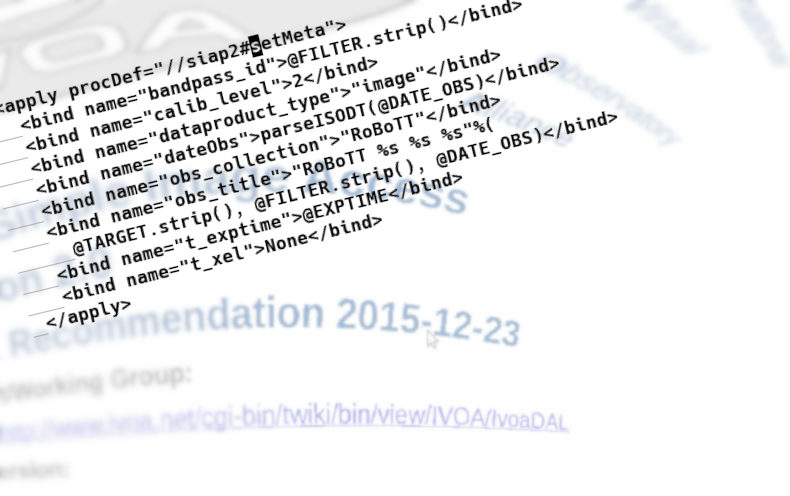
    a distorted title page of the SIAP version 2 standard, centred on the date 2015-12-23

    Ten years after, let me talk about SIAP version 2.

    In December 2015, the IVOA made Simple Image Access Version 2.0 (hereafter: SIAv2) a Recommendation (that is: the standard you should be following). I am fairly sure that most people into computers would have understood that as “Don't do Simple Image Access version 1 (SIAv1) any more“. As of ten years ago.

    This is not how things worked out. Actually, to this day new SIAv1 services still come online. In the talk about major version transitions I gave in College Park last June, I remark that 20% of the registered SIAv1 services were younger than 30 months.

    There are many reasons why obsoleting SIAv1 has not worked (yet); very frankly, I had rather fiercely argued we don't want SIAv2 at all on grounds that Obscore is all you need to discover products of observations.

    But since it's there now I feel I should do something for its adoption, beginning with not pushing out any new SIAv1 services myself. So, when a data provider sent me an RD they built from a previous one and it would have published a new SIAv1 service, I thought this was the time to start updating my own services.

    The next step then is to encourage DaCHS adopters to help out, too, that is, to port over their RDs from doing SIAP version 1 to doing SIAP version 2[1]. That's why I am writing this blog post.

    Going From SIAv1 to SIAv2 in 11 Moderately Difficult Steps

    Since the output table schema (and quite a bit beyond that) changed between the two version, the port is not entirely trivial; if it were, we wouldn't have done a major version (i.e., breaking) change in the first place. But I'd argue it's quite doable when two conditions are met:

    • You have a DaCHS version 2.8 or later (if not, you should upgrade anyway).
    • You are not using siapCutoutCore right now; what this does is hard to replicate in SIAv2 (because positional constraints are now optional), and so if you want to keep the auto-cutout functionality, you probably are stuck on SIAv1.

    That said, here's my recipe:

    1. Change the mixin on the table that keeps the image metadata. So far, you probably had mixin="//siap#pgs". Drop this and add:

      <mixin have_bandpass_id="True">//siap2#pgs</mixin>
      

      to the table body instead. If you really have no bandpass you would like to mention, you can leave out the attribute definition.

    2. Change the obscore mixin in the table body if you did an obscore publication (skip this step if not). With SIAv2, write instead:

      <mixin preview="access_url || '?preview=True'"
        >//obscore#publishObscoreLike</mixin>
      

      It is really simple now because SIAv2 just re-uses the obscore schema.

      Keep your old mixin definition in a scratch pad (or the version control history at least), because it will help you when you fill out the parameters to //siap2#setMeta.

    3. Change any index statements for standard columns you may have; the column names are completely different between SIAv1 and SIAv2. Classic examples include:

      • bandpassId is bandpass_id (if available)
      • bandpassLo is em_min
      • bandpassHi is em_max
      • dateObs should become indexes on t_min and t_max.

      If your table is small enough that you managed without indexes so far, don't bother creating new ones.

    4. Check custom extension fields for whether they are now in core SIAv2. The classic case is exposure time, which was missing in SIAv1. Just drop your custom column definition(s).

    5. If there is datalink on the SIAP table, you will have to change its definition, too; the relevant column is now obs_publisher_did. If your datalink service has the id dl, the result of the operation would be this:

       <meta name="_associatedDatalinkService">
        <meta name="serviceId">dl</meta>
        <meta name="idColumn">obs_publisher_did</meta>
      </meta>
      

      This may lead to datalink failures in DaCHS < 2.13 (in that the datasets are no longer found). If this bites you, let me know.

    6. Fix the rowmaker for the SIAP table. For the computePGS and getBandFromFilter apply, just add a 2 to their procDef references, so that these become //siap2#computePGS and //siap2#getBandFromFilter (if applicable).

      The main work is going from //siap#setMeta to //siap2#setMeta, because their parameter sets are somewhat different, although they do map to each other to some degree.

      The way to do the migration is to go through SIAv2's setMeta's parameter list in the reference documentation and identify the old parameters, or take the values from your obscore definition. Once you are past this point, you have done the heavy lifiting.

      (For completeness, let me mention that you will probably get away with dropping pixflags and keeping the other parameters as they are, as there is some compatibility glue; but you'd miss setting up extra SIAv2 metadata, and that would be a shame).

    7. Experimentally run dachs imp. This will probably fail because there are references to old column names in, say, service definitions. Resolve these based on the names you used in setMeta (which largely double as the column names). When you made DaCHS accept your refurbished RD and have run the import, use dachs info to catch metadata items you have missed.

    8. If you used a shared core for both a service with the siap.xml renderer and the web form service, move that core into the web form service. Use //siap2#humanInput for the new positional constraint, and drop the #protoInput, if it is there, because it is no longer needed.

    9. The protocol service has to have allowed="siap2.xml", and its new core is:

      <dbCore queriedTable="main">
        <FEED source="//siap2#parameters"/>
      </dbCore>
      

      Replace "main" with whatever your table is called, and add any custom parameters you would like to have.

    10. In your regression tests (you have some, don't you?), change the renderers in the URIs (siap2.xml instead of siap.xml), and change POS and SIZE into POS="CIRCLE ..."; it is likely that you will also have to change column names in the assertions.

    11. Run dachs pub q to tell the Registry that your access URL has changed.

    That's it.

    I would argue this is time well spent. Even if one day there will be a successor to SIAv2 (and I do hope there will be one), it is highly likely that its metadata schema will align very well with obscore's, and hence most of the work you just did will put you in a very good position to switch to DAP with just a few keystrokes.

    [1]If you have built SIA services with DaCHS 2.8 (2023) or later using dachs start, you will already have a SIAv2 service; see the discussion in the pertaining release notes.
  • Queries Against My Obscore Are Slow!

    Content Warning: This is fairly deep nerd stuff. If you are just a normal VO user, you probably don't want to know about this. You probably even don't want to know about it if you are running a smallish DaCHS site. But perhaps you'll enjoy it anyway.

    Last May, I finally tried to get to the bottom of why certain queries against my obscore table – and in particular some joins I care about – were unneccessarily slow. The immediate use case was that I wanted to join the proposed radio extension for obscore to the main obscore table like this:

    SELECT COUNT(*)
        FROM ivoa.obscore
        JOIN ivoa.obs_radio
        USING (obs_publisher_did)
    

    This looks harmless, in particular since there are almost always indexes on obs_publisher_did columns for operational purposes: DaCHS uses them to locate rows in, for instance, Datalink operation.

    It is not. Harmless, I mean. On the contrary.

    Match Your Types Before You UNION ALL

    The main reason why there is a trap is that ivoa.obscore in DaCHS is a view (i.e., some sort of virtual table defined by a SQL query). This is because typically, multiple data collections contribute, and they can change independently of each other. We do not want to have to rebuild a full obscore table (which has almost 150 million rows in the Heidelberg data centre right now) just because we fix the metadata of a handful of images somewhere.

    Hence, ivoa.obscore is built somewhat like this in DaCHS[1]:

    CREATE OR REPLACE VIEW ivoa.obscore AS
     SELECT 'image'::text AS dataproduct_type,
        NULL::text AS dataproduct_subtype,
        2::smallint AS calib_level,
        'BGDS'::text AS obs_collection,
        ...
     FROM bgds.data
    UNION ALL
      SELECT 'image'::text AS dataproduct_type,
        NULL::text AS dataproduct_subtype,
        3::smallint AS calib_level,
      ...
    [and 42 further subqueries that are union-ed together]
    

    It turns out that this architecture is dangerous in Postgres.

    Laurenz Albe has a writeup on the underlying problem, which he summarises in a cartoon as “Before I UNION ALL you, be sure that your types match”. In short, UNION ALL becomes a planner barrier when the types of the columns of the relations being merged do not exactly match. For this purpose, a bigint is completely different from an integer.

    Full disclosure: it's not like I figured out the applicability of Laurenz' analysis to the DaCHS troubles by myself. It actually took multiple applications of the cluestick by Tom Lane, Laurenz, and others on pgsql-general.

    Known Problem Is Not Solved Problem

    Hence, since May, I sort-of understood the problem. Fixing it, on the other hand, seemed rather overwhelming given the size of the view and sometimes multiple levels of view building. In consequence, I procrastinated actually doing something about it until some time last November when I realised that the computer could support the analysis of what types from which tables do not match.

    I therefore wrote analyze-obscore.py and added it to the DaCHS repo. It will (presumably) never be part of the DaCHS package, but you can simply run it from a clone of the repo – and should do so if you have an obscore view fed from multiple tables.

    The output then is something like:

    ==== access_estsize ====
    
      bgds.data                      accsize/1024
      danish.data                    accsize/1024
      dfbsspec.ssa                   accsize/1024
      plts.data                      accsize/1024
      emi.main                       access_estsize (bigint)
      rosat.images                   accsize/1024
      califadr3.cubes                10
      robott.data                    accsize/1024
      k2c9vst.timeseries             accsize/1024
      dasch.narrow_plates            access_estsize (bigint)
      onebigb.ssa                    accsize/1024
      [...]
    
    ==== access_format ====
    
      bgds.data                      mime (text)
      danish.data                    mime (text)
      dfbsspec.ssa                   mime (text)
      plts.data                      mime (text)
      emi.main                       access_format (text)
      rosat.images                   mime (text)
      califadr3.cubes                'application/x-votable+xml;content=datalink'
      [...]
    
    ==== calib_level ====
    
      bgds.data                      2
      danish.data                    2
      dfbsspec.ssa                   2
      plts.data                      1
      emi.main                       calib_level (smallint)
      rosat.images                   2
      califadr3.cubes                3
      [...]
    

    and so on. That is: for each table contributing to a column, it either shows the source column together with its type, a literal, or the full expression. Literals are not problematic: as it turns out, DaCHS has always cast them to the appropriate type, so as long as the other source columns match what obscore thinks the columns ought to be, you should be fine.

    Expressions are more difficult. The only way to be sure there is to ask Postgres, somewhat like this:

    select pg_typeof(accsize/1024) from bgds.data limit 1
    

    Changing Types En Masse

    In my case, I had lots of inconsistencies between columns coming from SSA and more directly from obscore-like tables. If you have spectra and other things in one obscore table created by DaCHS <2.12.2, so will you.

    This is because in my obscore implementation I followed the somewhat ill-advised types written down in (but in my reading not actually requried by) the obscore specification (p. 21). There is no conceivable scenario that would require more than 231 polarisation states (the pol_xel column, which is supposed to be “adql:BIGINT”), and I do not feel overly future-skeptic when I say that it will also be some time until we have images with a linear dimension of more than two billion. There is also no good reason to have an order-of-magnitude value like em_res_power to 16 significant digits (as implied by “adql:DOUBLE”)[2].

    I have cleaned this up in DaCHS 2.12.2. With this, the types of Obscore and the corresponding columns in SSA and SIAP are consistent within DaCHS' metadata declarations.

    However, the on-disk tables will keep their original types regardless of what DaCHS claims they are. You could fix this by re-importing the tables, but that would take quite a while, at least in my case. I have hence opted for targeted updates.

    The first step in that procedure is to figure out where Postgres' ideas of columns are now different from DaCHS' ideas given the recent metadata updates. For that, dachs val has had the -c (or --compare-db) flag for a long time. Running:

    dachs val -vc ALL
    

    gives you a list of all RDs that need work because the on-disk types (which actually determine the query plan) differ from DaCHS' expectations (which will fix the UNION ALL trouble). Once they match, you can feel entitled to a good query plan.

    Based on this, I have incrementally built a fixing script on my development system. As I'm pointing out towards the end of Publishing a Service in the DaCHS tutorial, the recommended way to run a DaCHS-based data centre is to have test snippets of almost all the resources on the production system on a <cough> development system (presumably: your laptop). That's what I do, and in this way I built this script:

    import subprocess
    
    from gavo import api
    
    with api.getWritableAdminConn() as conn:
            conn.execute("DROP VIEW IF EXISTS ivoa.obscore")
            conn.execute("DROP VIEW IF EXISTS dasch.plates")
    
            for table_name in ["emi.main", "dasch.narrow_plates"]:
                    conn.execute(f"ALTER TABLE {table_name} ALTER t_xel TYPE integer")
    
            for table_name in [
                            "emi.main", "dasch.narrow_plates", "ppakm31.cubes", "applause.main",]:
                    conn.execute(f"ALTER TABLE {table_name} ALTER s_xel1 TYPE integer")
                    conn.execute(f"ALTER TABLE {table_name} ALTER s_xel2 TYPE integer")
    
            for table_name in [
                            "emi.main",
                            "dasch.narrow_plates"]:
                    conn.execute(f"ALTER TABLE {table_name} ALTER pol_xel TYPE integer")
    
            for table_name in [
                            "emi.main",
                            "dasch.narrow_plates",
                            "califadr3.cubes"]:
                    conn.execute(f"ALTER TABLE {table_name} ALTER em_xel TYPE integer")
                    conn.execute(f"ALTER TABLE {table_name} ALTER em_res_power TYPE real")
    
            for table_name in [
                            "emi.main",
                            "dasch.narrow_plates",
                            "ppakm31.cubes",
                            "applause.main",
                            "califadr3.cubes"]:
                    conn.execute(f"ALTER TABLE {table_name} ALTER em_min TYPE real")
                    conn.execute(f"ALTER TABLE {table_name} ALTER em_max TYPE real")
    
            for table_name in [
                            "emi.main",
                            "dasch.narrow_plates",
                            "applause.main"]:
                    conn.execute(f"ALTER TABLE {table_name} ALTER s_resolution TYPE real")
                    conn.execute(f"ALTER TABLE {table_name} ALTER s_pixel_scale TYPE real")
                    conn.execute(f"ALTER TABLE {table_name} ALTER s_fov TYPE real")
    
    
    for rd_id in ["emi/q", "califa/q3", "rome/q", "dasch/q", "ppakm31/q"]:
            subprocess.call(["dachs", "imp", "-m", rd_id])
    
    subprocess.call(["dachs", "imp", "dasch/q", "make-view"])
    subprocess.call(["dachs", "imp", "//obscore"])
    

    As I said: which columns to fix I learned from dachs val -vc; the extra DaCHS operations were necessary because Postgres refused the type changes as long as the views were still defined.

    Success?

    This entire operation has made quite a few obscore queries a lot faster.

    Regrettably, the motivating query, viz.,:

    select count(*)
    from ivoa.obscore
    natural join ivoa.obs_radio
    

    is still slow. I have dug a bit into why Postgres does not find the seemingly obvious plan of just materialising the join with the tiny obs_radio table and contented myself with the note that has been in section 9.21 of the postgres documentation forever:

    Users accustomed to working with other SQL database management systems might be disappointed by the performance of the count aggregate when it is applied to the entire table. A query like:

    SELECT count(*) FROM sometable;
    

    will require effort proportional to the size of the table: PostgreSQL will need to scan either the entire table or the entirety of an index that includes all rows in the table.

    But at least a query like:

    select dataproduct_type, access_url, t_min, t_max
    from ivoa.obscore
    natural join ivoa.obs_radio
    where t_min between 56000 and 56005
    

    is fast, and until further trouble that's good enough for me.

    Followup (2026-03-03)

    Well, futher trouble came afoot, and with DaCHS 2.12.3 you can therefore materialise your obscore table. This is as simple as saying:

    materialiseObscore: True
    

    in the [ivoa] section of your /etc/gavo.rc and then saying:

    dachs imp //obscore
    dachs limits //obscore
    

    in a shell. For large obscore tables, this will take a while (about 30 minutes for the imp in my data centre). I don't intend to do that more than once a month on average, and while queries to ivoa.obscore will block in that time, I think it's worth it: Query plans and all become a lot more readable, and my count(*) query suddenly finishes in less than a second. That's a big win over the several minutes I had before.

    Well: At least I have learned quite a bit about UNION ALL, and also about gathering metadata from many RDs at a time. So, this whole investigation was not a total waste of time.

    And if you have to know: this is not actually a materialised view but rather a normal, full-fledged table. That is because you cannot drop tables that are part of a materialised view, whereas once their rows are in a table, postgres lets you drop them as you like. And dropping is important if you want to develop your data collections.

    [1]In case you wonder: the individual parts of this union are kept in a table ivoa._obscoresources that you can inspect and even manipulate for special effects. The management of that table is among there more complex things one can do in DaCHS RDs. If you are curious, dachs adm dump //obscore will show you all the magic.
    [2]I put these type names into quotation marks because they were never formally defined. What Obscore does there has been identified as an antipattern in the meantime; newer specifications of similar schemas only distinguish floating point, integral, and string types and leave the choice of lengths to the implementations. If I may say so myself, I like the considerations on types within section 8 of RegTAP.
  • DaCHS 2.12 Is Out

    The DaCHS logo, a badger's head and the text "VO Data Publishing"

    A bit more than one month after the last Interop, I have released the next version of GAVO's data publication package, DaCHS. This is the customary post on what is new in this release.

    There is no major headline for DaCHS 2.12, but there is a fair number of nice conveniences in it. For instance, if you have a collection of time series to publish, the new time series service template might help you. You get it by calling dachs start timeseries; I will give you that it suffers from about the same malady as the existing ssap+datalink one: There is a datalink service built in from the start, which puts up a scary amount of up-front complexity you have to master before you get any sort of gratification.

    There is little we can do about that; the creators of time series data sets just have not come up with a good convention for how to write them. I might be moved to admit that putting them into nice FITS binary tables might count as acceptable. In practice, none of the time series I got from my data providers came in a format remotely fit for distribution. Perhaps Ada's photometric time series convention (which is what you will deliver with the template) is not the final word on how to represent time series, but it is much better than anything else I have seen. Turning what you get from your upstreams into something you can confidently hand out to your users just requires Datalink at this point I'm afraid[1].

    I will add tutorial chapters for how to deal with the datalink-infested templates one of these days; within them bulk commenting will play a fairly important role. For quite a while, I have recommended to define a lazy macro with a CDATA section in order to comment out a large portion of an RD. I have changed that recommendation now to open such comments with <macDef raw="True" name="todo"><![CDATA[ and close them with ]]></macDef>. The new (2.12) part is the raw="True". This only means that DaCHS will not try to expand macros within the macro definition. So far, it has done that, and that was a pain in for the datalink-infested templates, because there are macro calls in the templates, but some of them will not work in the RD context the macDef is in, which then lead to hard-to-understand RD parse errors.

    By the way, in case you would like to write your template to a file other than q.rd (perhaps because there already is one in your resdir), there is now an -o option to dachs start.

    Speaking of convenience, defining spectral coverage has become a lot less of a pain in 2.12. So far, whenever you had to manually define a resource's STC coverage (and that is not uncommon for the spectral axis, where dachs limits often will find no suitable columns or does not find large gaps in observations in multiple narrow bands), you had to turn the Ångströms or GHz into Joule by throwing in the right amounts of c, h, and math operators. Now, you just add the appropriate units in square brackets and let DaCHS work out the rest; DaCHS will also ensure that the lower limit actually is smaller than the upper limit. A resource covering a number of bands in various parts of the spectrum might thus say:

    <coverage>
      <spectral>100[kHz] 21.5[cm]</spectral>
      <spectral>2[THz] 1[um]</spectral>
      <spectral>653[nm] 660[nm]</spectral>
      <spectral>912[Angstrom] 10[eV]</spectral>
      <spectral>20[GeV] 100[GeV]</spectral>
    </coverage>
    

    DaCHS will produce a perfectly viable coverage declaration for the Registry from that.

    Still in the convenience department, I have found myself define a STREAM (in case you don't know what I'm talking about: read up on them in the tutorial) that creates pairs of columns for a value and its error once to often. Thus, there is now the //procs#witherror stream. Essentially, you can replace the <column in a column definition with <FEED source="//procs#witherror, and you get two columns: One with the name itself, the other with a name of err_name, and the columns ought to have suitable metadata. For instance:

    <FEED source="//procs#witherror
      name="rv" type="double precision"
      unit="km/s" ucd="spect.dopplerVeloc"
      tablehead="RV_S"
      description="Radial velocity derived by the Serval pipeline"
      verbLevel="1"/>
    

    You cannot yet have values children with witherror, but it is fairly uncommon for such columns to want them: you won't enumerate values or set null values (things with errors will be floating point values, which have “natural” null values at least in VOTable), and columns statistics these days are obtained automatically by dachs limits.

    You can take this a turn further and put witherror into a LOOP. For instance, to define ugriz photometry with errors, you would write:

    <LOOP>
      <csvItems>
      item, ucd
      u, U
      g, V
      r, R
      i, I
      z, I
      </csvItems>
      <events passivate="True">
        <FEED source="//procs#witherror name="mag_\item"
          unit="mag" ucd="phot.mag;em.opt.\ucd">
          tablehead="m_\item"
          description="Magnitude in \item band"/>
      </events>
    </LOOP>
    

    There is a difficult part in this: the passivate="True" in the events element. If you like puzzlers, you may want to figure out why that is needed based on what I document about active tags in the reference documentation. Metaprogramming and Macros become subtle not only in DaCHS.

    Far too few DaCHS operators define examples for their TAP services. Trust me, your users will love them. To ensure that they still are good, you can now pass an -x flag to dachs val (nb not dachs test); that will execute all of the TAP examples defined in the RD against the local server and complain when one does not return at least one valid row. The normal usage would be to say dachs val -x //tap if you define your examples in the userconfig RD; but with hierarchical examples, any RD might contain examples modern TAP clients will pick up.

    There is another option to have an example tested: you could put the query into a macro (remember macDef above?) and then use that macro both in the example and in a regTest element. That is because url attributes now expand macros. That may be useful for other and more mundane things, too; for instance, you could have DaCHS fill in the schema in queries.

    Actual new features in 2.12 are probably not very relevant to average DaCHS operators, at least for now:

    • users can add indexes to their persistent uploads (featured here before)
    • registration of VOEvent streams according to the current VOEvent 2.1 PR (ask if interested; there is minimal documentation on this at this point).
    • an \if macro that sometimes may be useful to skip things that make no sense with empty strings: \if{\relpath}{http://example.edu/p/\relpath} will not produce URLs if relpath is empty.
    • if you have tables with timestamps, it may be worth running dachs limits on them again, as DaCHS will now obtain statistics for them (in MJD, if you have to know) and consequently provide, e.g., placeholders.
    • our spatial WCS implementation no longer assumes the units are degrees (but still that it is dealing with spherical coordinates).
    • when params are array-valued, any limits defined in values are now validated component-wise.

    Finally, if you inspected a diff to the last release, you would see a large number of changes due to type annotation of gavo.base. I have promised to my funders to type-annotate the entire DaCHS code (except perhaps for exotic stuff I shouldn't have written in the first place, viz., gavo.stc) in order to make it easier for the community to maintain DaCHS.

    From my current experience, I don't think I will keep this particular promise. After annotating several thousand lines of code my impression is that the annotation is a lot of effort even with automatic annotation helpers (the cases it can do are the ones that would be reasonably quick for a human, too). The code does in general improve in consequence (but not always), but not fundamentally, and it does not become dramatically more readable in most places (there are exceptions to that reservation, though).

    All in all, the cost/benefit ratio just does not seem to be small enough. And: the community members that I want to encourage to contribute code would feel obliged to write type annotations, too, which feels like an extra hurdle I would like to spare them.

    [1]Ok: you could also do an offline conversion of the data collection before ingestion, but I tend to avoid this, partly because I am reluctant to touch upstream data, but in this case in particular because with the current approach it will be much easier to adopt improved serialisations as they become defined.
  • DaCHS 2.11: Persistent TAP Uploads

    The DaCHS logo, a badger's head and the text "VO Data Publishing"

    The traditional autumn release of GAVO's server package DaCHS is somewhat late this year, but not so late that could not still claim it comes after the interop. So, here it is: DaCHS 2.11 and the traditional what's new post.

    But first, while I may have DaCHS operators' attention: If you have always wondered why things in DaCHS are as they are, you will probably enjoy the article Declarative Data Publication with DaCHS, which one day will be in the proceedings of ADASS XXXIV (and before that probably on arXiv). You can read it in a pre-preprint version already now at https://docs.g-vo.org/I301.pdf, and feedback is most welcome.

    Persistent TAP Uploads

    The potentially most important new feature of DaCHS 2.11 (in my opinion) will not be news to regular readers of this blog: Persistent TAP Uploads.

    At this point, no client supports this, and presumably when clients do support it, it will look somewhat different, but if you like the bleeding edge and have users that don't mind an occasional curl or requests call, you would be more than welcome to help try the persistent uploads. As an operator, it should be sufficient to type:

    dachs imp //tap_user
    

    To make this more useful, you probably want to hand out proper credentials (make them with dachs adm adduser) to people who want to play with this, and point the interested users to the demo jupyter notebook.

    I am of course grateful for any feedback, in particular on how people find ways to use these features to give operators a headache. For instance, I really would like to avoid writing a quota system. But I strongly suspect will have to…

    On-loaded Execute-s

    DaCHS has a built-in cron-type mechanism, the execute Element. So far, you could tell it to run jobs every x seconds or at certain times of the day. That is fine for what this was made for: updates of “living” data. For instance, the RegTAP RD (which is what's behind the Registry service you are probably using if you are reading this) has something like this:

    <execute title="harvest RofR" every="40000">
      <job><code>
          execDef.spawnPython("bin/harvestRofR.py")
      </code></job>
    </execute>
    

    This will pull in new publishing registries from the Registry of Registries, though that is tangential; the main thing is that some code will run every 40 kiloseconds (or about 12 hours).

    Against using plain cron, the advantage is that DaCHS knows context (for instance, the RD's resdir is not necessary in the example call), that you can sync with DaCHS' own facilities, and most of all that everything is in once place and can be moved together. By the way, it is surprisingly simple to run a RegTAP service of your own if you already run DaCHS. Feel free to inquire if you are interested.

    In DaCHS 2.11, I extended this facility to include “events” in the life of an RD. The use case seems rather remote from living data: Sometimes you have code you want to share between, say, a datalink service and some ingestion code. This is too resource-bound for keeping it in the local namespace, and that would again violate RD locality on top.

    So, the functions somehow need to sit on the RD, and something needs to stick them there. To do that, I recommended a rather hacky technique with a LOOP with codeItems in the respective howDoI section. But that was clearly rather odious – and fragile on top because the RD you manipulated was just being parsed (but scroll down in the howDoI and you will still see it).

    Now, you can instead tell DaCHS to run your code when the RD has finished loading and everything should be in place. In a recent example I used this to have common functions to fetch photometric points. In an abridged version:

    <execute on="loaded" title="define functions"><job>
      <setup imports="h5py, numpy"/>
      <code>
      def get_photpoints(field, quadrant, quadrant_id):
        """returns the photometry points for the specified time series
        from the HDF5 as a numpy array.
    
        [...]
        """
        dest_path = "data/ROME-FIELD-{:02d}_quad{:d}_photometry.hdf5".format(
          field, quadrant)
        srchdf = h5py.File(rd.getAbsPath(dest_path))
        _, arr = next(iter(srchdf.items()))
    
        photpoints = arr[quadrant_id-1]
        photpoints = numpy.array(photpoints)
        photpoints[photpoints==0] = numpy.nan
        photpoints[photpoints==-9999.99] = numpy.nan
    
        return photpoints
    
    
      def get_photpoints_for_rome_id(rome_id):
        """as get_photpoints, but taking an integer rome_id.
        """
        field = rome_id//10000000
        quadrant = (rome_id//1000000)%10
        quadrant_id = (rome_id%1000000)
        base.ui.notifyInfo(f"{field} {quadrant} {quadrant_id}")
        return get_photpoints(field, quadrant, quadrant_id)
    
      rd.get_photpoints = get_photpoints
      rd.get_photpoints_for_rome_id = get_photpoints_for_rome_id
    </code></job></execute>
    

    (full version; if this is asking you to log in, tell your browser not to wantonly switch to https). What is done here in detail again is not terribly relevant: it's the usual messing around with identifiers and paths and more or less broken null values that is a data publisher's everyday lot. The important thing is that with the last two statements, you will see these functions whereever you see the RD, which in RD-near Python code is just about everywhere.

    dachs start taptable

    Since 2018, DaCHS has supported kickstarting the authoring of RDs, which is, I claim, the fun part of a data publisher's tasks, through a set of templates mildly customised by the dachs start command. Nobody should start a data publication with an empty editor window any more. Just pass the sort of data you would like to publish and start answering sensible questions. Well, “sort of data” within reason:

    $ dachs start list
    epntap -- Solar system data via EPN-TAP 2.0
    siap -- Image collections via SIAP2 and TAP
    scs -- Catalogs via SCS and TAP
    ssap+datalink -- Spectra via SSAP and TAP, going through datalink
    taptable -- Any sort of data via a plain TAP table
    

    There is a new entry in this list in 2.11: taptable. In both my own work and watching other DaCHS operators, I have noticed that my advice “if you want to TAP-publish any old material, just take the SCS template and remove everything that has scs in it” was not a good one. It is not as simple as that. I hope taptable fits better.

    A plan for 2.12 would be to make the ssap+datalink template less of a nightmare. So far, you basically have to fill out the whole thing before you can start experimenting, and that is not right. Being able to work incrementally is a big morale booster.

    VOTable 1.5

    VOTable 1.5 (at this point still a proposed recommendation) is a rather minor, cleanup-type update to the VO's main table format. Still, DaCHS has to say it is what it is if we want to be able to declare refposition in COOSYS (which we do). Operators should not notice much of this, but it is good to be aware of the change in case there are overeager VOTable parsers out there or in case you have played with DaCHS MIVOT generator; in 2.10, you could ask it to do its spiel by requesting the format application/x-votable+xml;version=1.5. In 2.11, it's application/x-votable+xml;version=1.6. If you have no idea what I was just saying, relax. If this becomes important, you will meet it somewhere else.

    Minor Changes

    That's almost it for the more noteworthy news; as usual, there are a plethora of minor improvements, bug fixes and the like. Let me briefly mention a few of these:

    • The ADQL form interface's registry record now includes the site name. In case you are in this list, please say dachs pub //adql after upgrading.
    • More visible legal info, temporal, and spatial coverage in table and service infos; one more reason to regularly run dachs limits!
    • VOUnit's % is now known to DaCHS (it should have been since about 2.9)
    • More vocabulary validation for VOResource generation; so, dachs pub might now complain to you when it previously did not. It is now right and was wrong before.
    • If you annotate a column as meta.bib.bibcode, it will be rendered as ADS links
    • The RD info links to resrecs (non-DaCHS resources, essentially), too.

    Upgrade As Convenient

    As usual, if you have the GAVO repository enabled, the upgrade will happen as part of your normal Debian apt upgrade. Still, if you have not done so recently, have a quick look at upgrading in the tutorial. If, on the other hand, you use the Debian-distributed DaCHS package and you do not need any of the new features, you can let things sit and enjoy the new features after your next dist-upgrade.

Page 1 / 7 »